ElasticSearch索引跨集群迁移
ElasticSearch索引跨集群迁移 点击上方“IT那活儿 ”公众号,关注后了解更多内容,不管IT什么活儿,干就完了!!! 单索引跨集群迁移:\ reindex方式 \ reindex方式可将索引数据直接从源ES集群导入到新ES集群。 1. 集群环境 源ES集群地址:xxx.x.xxx.65:9201 新ES集群地
来源: https://www.ucloud.cn/yun/129098.html 作者: 不知名网友 发布日期: 发布于2023-01-11 11:02
ElasticSearch索引跨集群迁移
点击上方“IT那活儿**”公众号,关注后了解更多内容,不管IT什么活儿,干就完了!!!**
单索引跨集群迁移:_reindex方式
_reindex方式可将索引数据直接从源ES集群导入到新ES集群。
1. 集群环境
源ES集群地址:xxx.x.xxx.65:9201
新ES集群地址:xxx.x.xxx.214:9201
2. 迁移目标
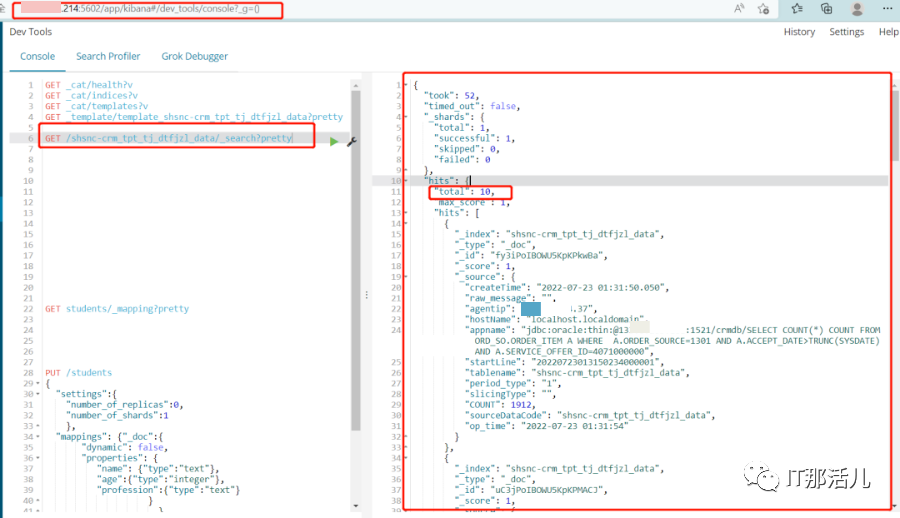
将索引shsnc-crm_tpt_tj_dtfjzl_data迁移至新ES集群,索引中包含10个文档。
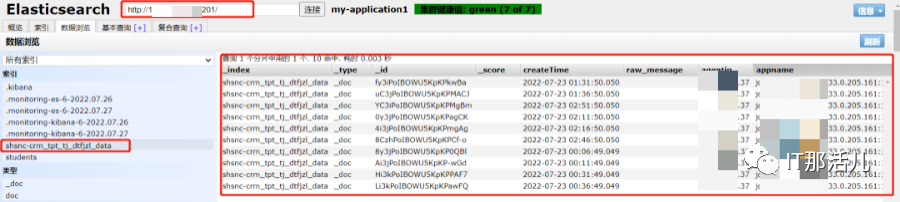
3. 新ES集群添加白名单并重启
**1)**在新ES集群添加白名单允许源集群reindex

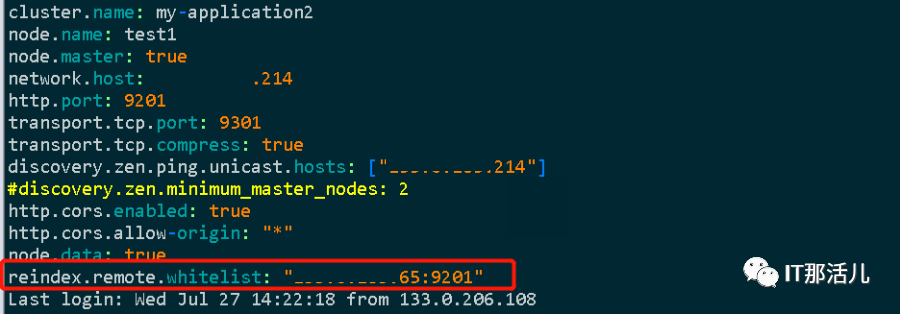
**2)**添加白名单后重启新ES集群
jps|grep -i elasticsearch|awk {print $1}|xargs kill –-停止新ES集群各节点./elasticsearch -d --启动新ES集群各节点

4. 创建索引并设置mapping
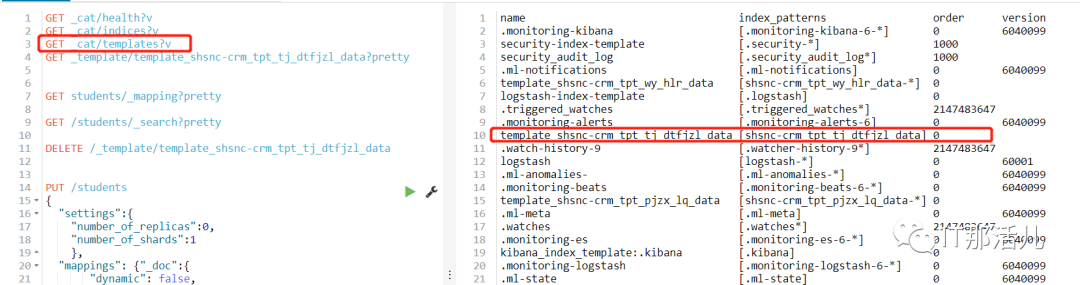
**1)**从源ES集群中导出索引模板template_ shsnc-crm_tpt_tj _dtfjzl_data
curl -u xxx.x.xxx.65:9201/_template/template_ shsnc-crm_tpt_tj* >> template.txt

**2)**在新ES集群中导入索引模板template_ shsnc-crm_tpt_tj _dtfjzl_data
curl -H "Content-Type: application/json"-XPUT http://xxx.x.XXX.214:9201/_template/template_shsnc-crm_tpt_tj_dtfjzl_data -d{"order": 0, "index_patterns": ["shsnc-crm_tpt_tj_dtfjzl_data"], "settings": {"index": {"number_of_shards": "1", "number_of_replicas": "0"}}, "mappings": {"_doc":{"dynamic": false, "properties": {"appname": {"ignore_above": 10000, "type": "keyword"}, "createTime": {"format": "yyyy-MM-dd HH:mm:ss.SSS", "type": "date"}, "raw_message": {"analyzer": "ik_smart", "type": "text"}, "startLine": {"ignore_above": 10000, "type": "keyword"}, "op_time": {"format": "yyyy-MM-dd HH:mm:ss", "type": "date"}, "COUNT": {"ignore_above": 10000, "type": "keyword"}, "cmdb_id": {"ignore_above": 10000, "type": "keyword"}, "agentip": {"ignore_above": 10000, "type": "keyword"}}}}, "aliases": {}}

5. 从源ES集群中reindex数据到新ES集群
注:为确保数据的完整性源ES集群需停止数据写入。
**1)**在新ES集群上运行如下命令
curl -H Content-Type: application/json-XPOST "http://xxx.x.xxx.214:9201/_reindex?pretty" -d {"source": {"remote": {"host": "http://xxx.x.xxx.65:9201"},"username": "xxxxxx", --username、password若有则指定,若无则去掉此项"password": "xxxxxx","index": "shsnc-crm_tpt_tj_dtfjzl_data","type": "_doc"},"dest": {"index": "shsnc-crm_tpt_tj_dtfjzl_data"}}
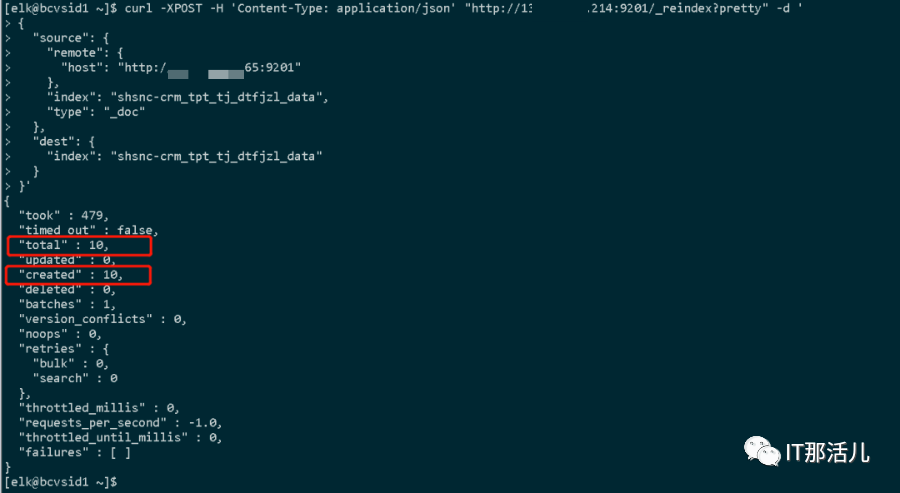
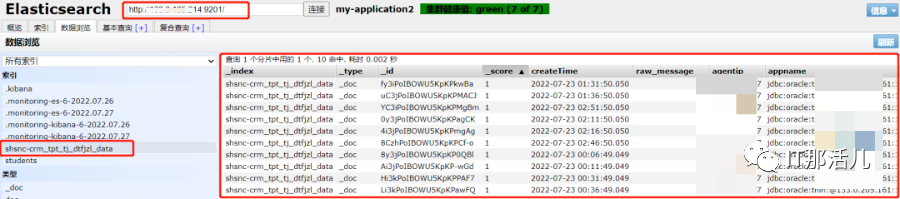
**2)**执行以上命令后,索引shsnc-crm_tpt_tj_dtfjzl_data的10个文档数据成功导入到新ES集群
全部索引跨集群迁移:_snapshot方式
_snapshot是Elasticsearch提供的用于对数据进行备份和恢复的接口,即从源ES集群创建数据快照,再将快照复制到目标集群进行恢复。
1. 集群环境
源ES集群地址:xxx.x.xxx.65:9201
新ES集群地址:xxx.x.xxx.20:9201
2. 迁移目标
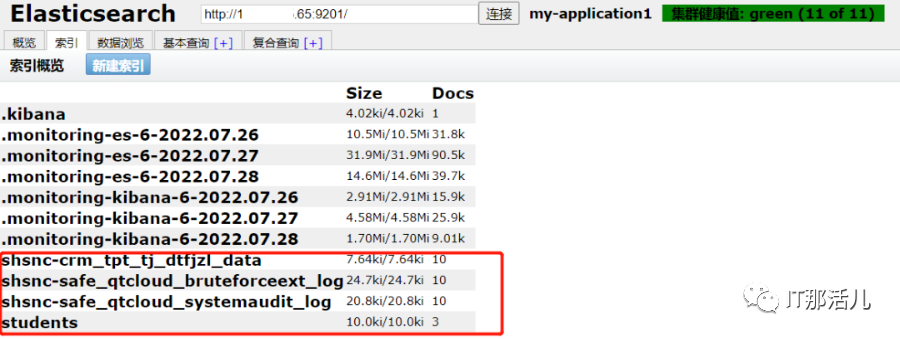
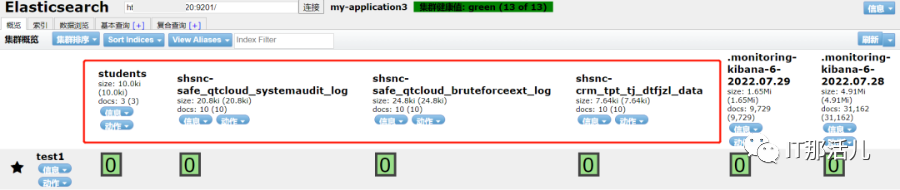
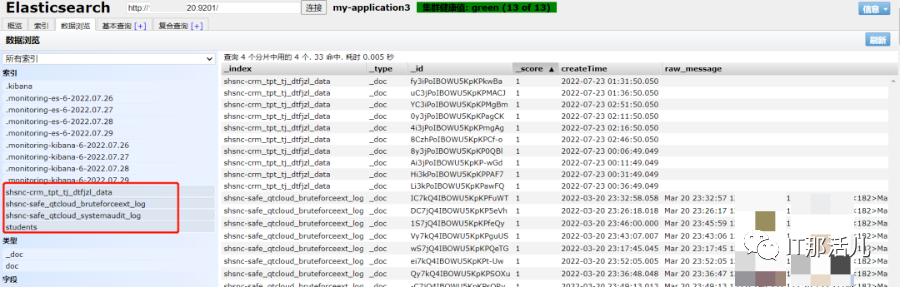
将源ES集群全部索引迁移至新ES集群,主要是红色框中的4个索引。
3. 在源集群中创建repository和snapshot
**1)**快照文件存放repositor仓库中,一个repositor仓库可以存放多个快照文件,repository支持多种类型,此处以fs类型来创建repository仓库,即将快照文件存放在文件系统中。
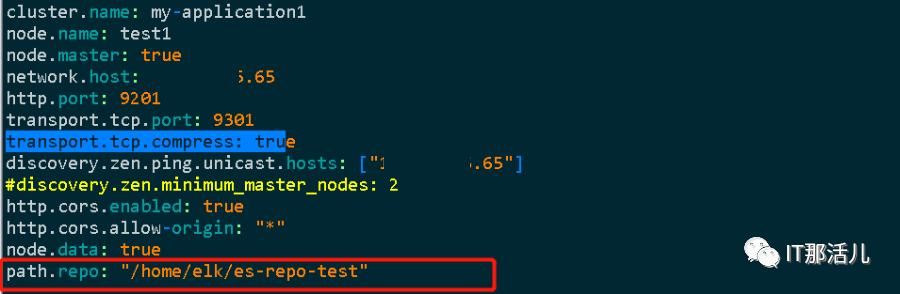
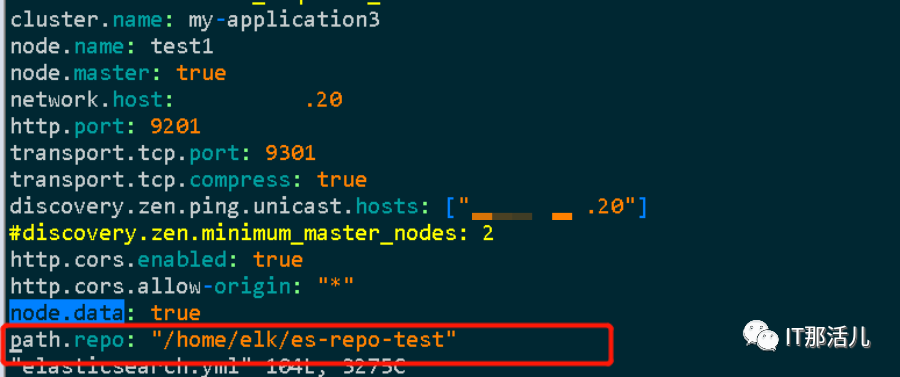
如下,在源ES集群的Elasticsearch.yml配置文件中设置repository路径,提前创建“/home/elk/es-repo-test”目录,添加配置后需要重启源ES集群。
**2)**创建repository
curl -H Content-Type: application/json-XPUT http://xxx.x.xxx.65:9201/_snapshot/my_backup -d {"type": "fs","settings": {"location": "/home/elk/es-repo-test","compress": true,"max_snapshot_bytes_per_sec":"20mb","max_restore_bytes_per_sec":"20mb"}}

注:
- max_snapshot_bytes_per_se:快照数据进入仓库时,限流每秒20mb;
- max_restore_bytes_per_sec:从仓库恢复数据时,限流每秒20mb。
**3)**创建snapshot,快照名称需小写,否则报错(version:6.4.0)
Curl -H Content-Type: application/json -XPUThttp://xxx.x.xxx.65:9201/_snapshot/my_backup/es-snapshot-1?wait_for_completion=true

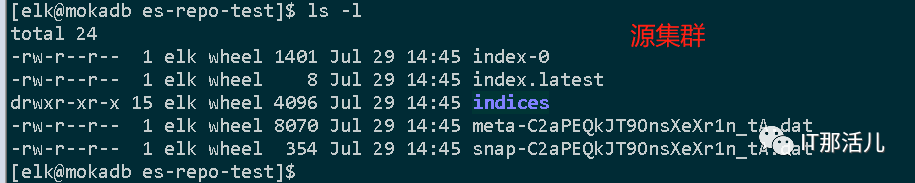
进入快照存放的目录,查看快照文件:

4. 在新集群中创建repository,并复制源集群中的snapshot文件
**1)**在新集群的elasticsearch.yml配置文件中设置repository路径,提前创建“/home/elk/es-repo-test”目录,添加配置后需要重启新ES集群

**2)**在新集群中创建repostory
curl -H Content-Type: application/json-XPUT http://xxx.x.xxx.20:9201/_snapshot/my_backup -d {"type": "fs","settings": {"location": "/home/elk/es-repo-test","compress": true,"max_snapshot_bytes_per_sec":"20mb","max_restore_bytes_per_sec":"20mb"}}

**3)**复制源集群中的snapshot文件到新集群

4. 在新集群中通过快照文件恢复索引
**1)**从源集群导入索引模板到目标集群
**2)**在新集群中恢复索引
curl -XPOST http://xxx.x.xxx.20:9201/_snapshot/my_backup/es-snapshot-1/_restore

**3)**新集群中查看索引恢复的状态
附:提升数据同步的技巧
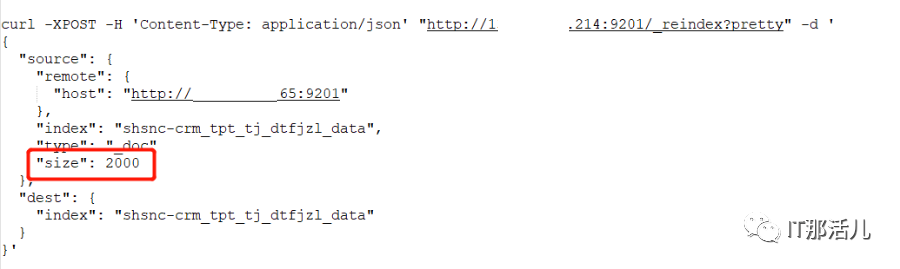
**1)**默认情况下reindex使用1000进行批量操作,可在source中修改size以提升批量写入。
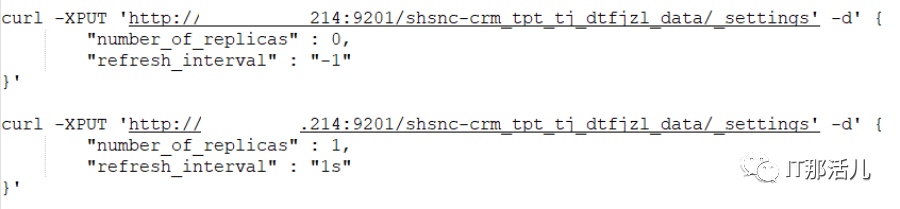
**2)**针对数据量比较大的索引,可以在迁移前将目标索引的副本数设置为0,刷新时间为-1(-1为不刷新),可加快数据同步速度,数据迁移完成后再改回。
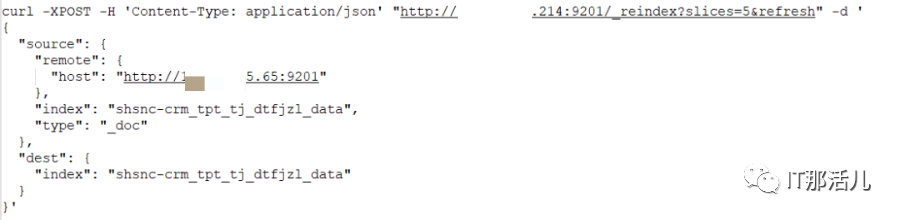
**3)**reindex支持使用sliced scroll功能以提升数据写入的效率,sliced scroll以并行化来重建索引,每个scroll 请求可以分解成多个slice请求,各个slice对立并行运行,写入效率要快很多倍
Slices可手动设置(slices=3),也可自动设置(slices=auto)。设置为auto时,对于单索引,slices等于分片数;针对多索引,slices等于分片的最小值。Slices等于分片数时,查询性能最高效;slices大于分片数时,不仅不会提升效率,反而会增加额外的开销。

本文作者:方 威(上海新炬中北团队)
本文来源:“IT那活儿”公众号
