Apache常用虚拟主机配置方法解析
1、apache服务器安装与配置 yum install httpd y 浏览器测试虚拟机ip地址,看到以下界面代表启动成功。 2、apache2配置文件 安装好httpd后会自动生成etc目录 主要配置文件:conf/httpd.conf 3、基于IP地址(服务器需要多个公网IP地址) (2)在/conf.d目录中增
来源: https://www.ucloud.cn/yun/128017.html 作者: 1480144907 发布日期: 发布于2022-10-16 17:42
1、apache服务器安装与配置
yum install httpd -y

浏览器测试虚拟机ip地址,看到以下界面代表启动成功。

2、apache2配置文件
安装好httpd后会自动生成etc目录
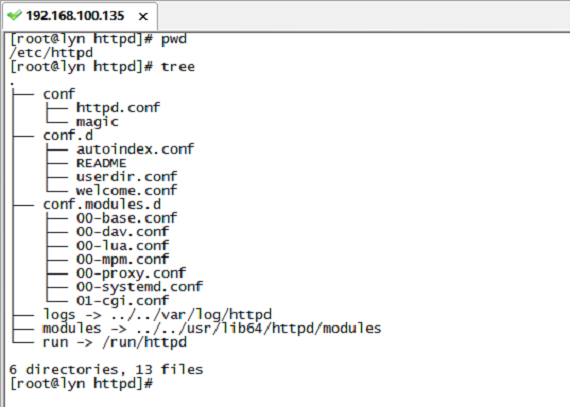
主要配置文件:conf/httpd.conf
3、基于IP地址(服务器需要多个公网IP地址)
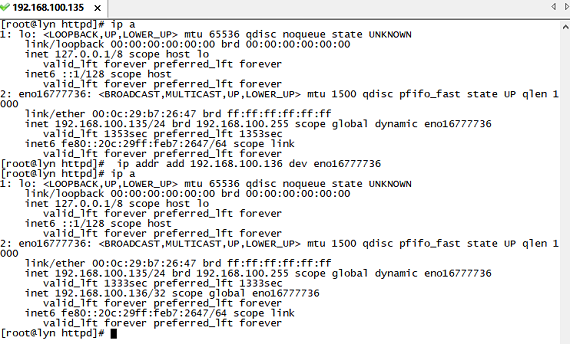
(2)在/conf.d目录中增加一个站点文件lyn1.conf
<VirtualHost 192.168.100.135> //本机ip地址
DocumentRoot /mnt/lyn1/   //网络数据目录
ServerName www.lyn1.com   //网站服务器的域名<Directory /mnt/lyn1/ >   //网站数据目录的权限
AllowOverride None    //不允许重写
Require all granted    //允许所有访问请求
</Directory>
</VirtualHost>
(3)在shiyan1.com对应网站的发布目录下增加网页文件index.html
<html>
<head>
<title>lyn1</title>
</head>
<body>
<h1>lyn1</h1>
this is the www.lyn1.com website
</body>
</html>
(4)在/etc/httpd/conf.d目录中增加一个站点文件lyn2.conf
<VirtualHost 192.168.100.136> //本机另一个ip地址
DocumentRoot /mnt/lyn2/   //网络数据目录
ServerName www.lyn2.com   //网站服务器的域名
<Directory /mnt/lyn2/ >   //网站数据目录的权限
AllowOverride None    //不允许重写
Require all granted    //允许所有访问请求
</Directory>
</VirtualHost>
vi /mnt/lyn2/index.html
<html>
<head>
<title>lyn2</title>
</head>
<body>
<h1>lyn2</h1>
this is the www.lyn2.com website
</body>
</html>
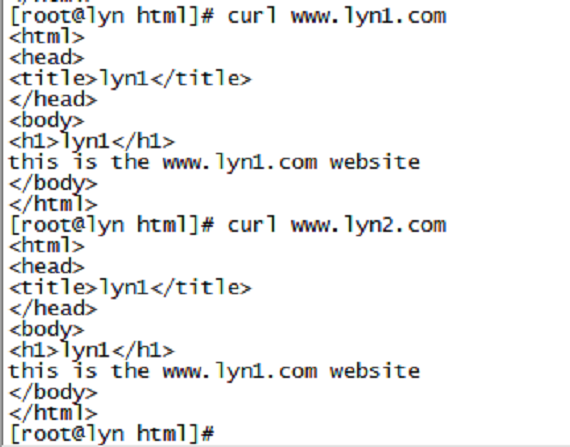
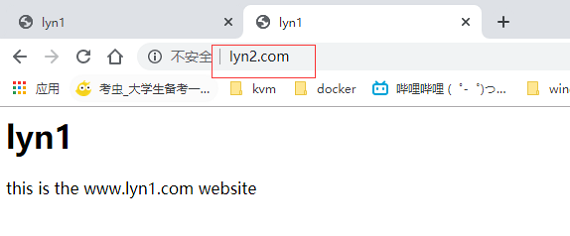
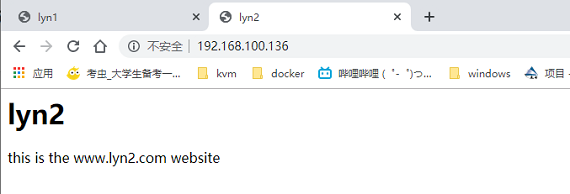
(6)重启Apache服务器,并使用浏览器进行验证
4、配置基于端口号的虚拟主机
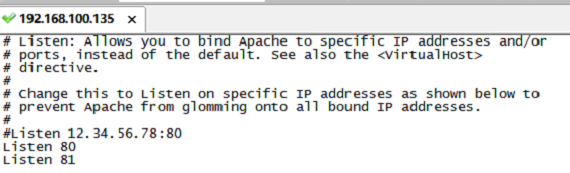
(1)在主配置文件/etc/httpd/conf/httpd.conf文件中增加监听端口81
(2)修改/etc/httpd/conf.d/lyn1.conf文件:
<VirtualHost 192.168.100.135:80>
ServerName www.lyn1.com
DocumentRoot /var/www/html/lyn1/
<Directory /var/www/html/lyn1/ >
AllowOverride None
Require all granted
</Directory>
</VirtualHost>
(3)修改/etc/httpd/conf.d/shiyan2.conf文件:
<VirtualHost 192.168.100.135:81>
ServerName www.lyn2.com
DocumentRoot /var/www/html/lyn2/
<Directory /var/www/html/lyn2/ >
AllowOverride None
Require all granted
</Directory>
</VirtualHost>
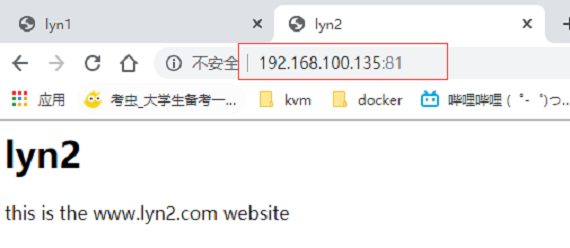
(4)重启Apache服务器,并使用浏览器进行验证
5、配置基于主机名的虚拟机
(1)注册DNS、测试时可以使用修改/etc/hosts方法,这里采用修改hosts方法
(2)在主配置文件/etc/httpd/conf.d/lyn1.conf文件中
<VirtualHost *:80>
ServerName www.lyn1.com
DocumentRoot /var/www/html/lyn1/
<Directory /var/www/html/lyn1/ >
AllowOverride None
Require all granted
</Directory>
</VirtualHost>
(3)在主配置文件/etc/httpd/conf.d/lyn2.conf文件中
<VirtualHost *:81>
ServerName www.lyn2.com
DocumentRoot /var/www/html/lyn2/
<Directory /var/www/html/lyn2/ >
AllowOverride None
Require all granted
</Directory>
</VirtualHost>
(4)重启apache2服务器并进行验证