Python实现配置热加载的方法
小编写这篇文章的目的,主要是给大家讲解一下,关于实现配置热加载的方法,具体是怎么操作呢?下面就给大家详细的解答下。 背景 由于最近有相关的工作需求,需要进行增添相关的新功能,实现配置热加载的功能。所谓的配置热加载,也就是说当服务收到配置更新消息之后,我们不用重启服务就可以使用最新的配置去执行任务。 如何实现 下面我分别
来源: https://www.ucloud.cn/yun/128005.html 作者: 89542767 发布日期: 发布于2022-10-14 10:12
小编写这篇文章的目的,主要是给大家讲解一下,关于实现配置热加载的方法,具体是怎么操作呢?下面就给大家详细的解答下。
背景
由于最近有相关的工作需求,需要进行增添相关的新功能,实现配置热加载的功能。所谓的配置热加载,也就是说当服务收到配置更新消息之后,我们不用重启服务就可以使用最新的配置去执行任务。
如何实现
下面我分别采用多进程、多线程、协程的方式去实现配置热加载。
使用多进程实现配置热加载
如果我们代码实现上使用多进程,主进程1来更新配置并发送指令,任务的调用是进程2,如何实现配置热加载呢?
使用signal信号量来实现热加载
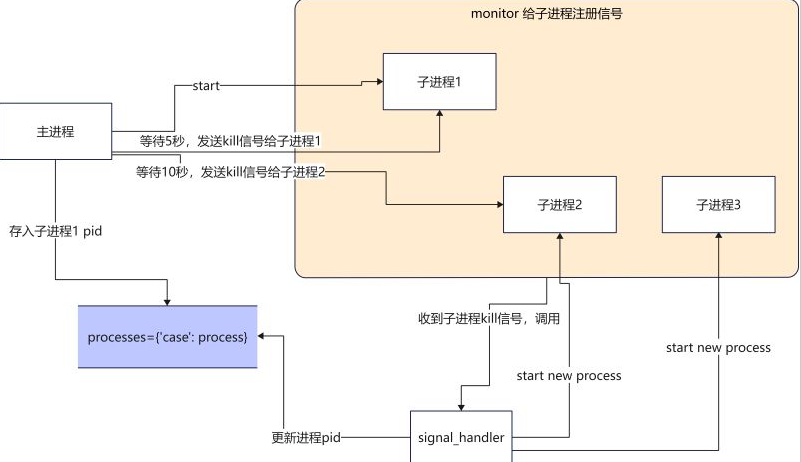
当主进程收到配置更新的消息之后(配置读取是如何收到配置更新的消息的?这里我们暂不讨论),主进程就向进子程1发送kill信号,子进程1收到kill的信号就退出,之后由信号处理函数来启动一个新的进程,使用最新的配置文件来继续执行任务。
main函数
  def main():
  #启动一个进程执行任务
  p1=Process(target=run,args=("p1",))
  p1.start()
  monitor(p1,run)#注册信号
  processes["case100"]=p1#将进程pid保存
  num=0
  while True:#模拟获取配置更新
  print(
  f"{multiprocessing.active_children()=},count={len(multiprocessing.active_children())}\n")
  print(f"{processes=}\n")
  sleep(2)
  if num==4:
  kill_process(processes["case100"])#kill当前进程
  if num==8:
  kill_process(processes["case100"])#kill当前进程
  if num==12:
  kill_process(processes["case100"])#kill当前进程
  num+=1
signal_handler函数
  def signal_handler(process:Process,func,signum,frame):
  #print(f"{signum=}")
  global counts
  if signum==17:#17 is SIGCHILD
  #这个循环是为了忽略SIGTERM发出的信号,避免抢占了主进程发出的SIGCHILD
  for signame in[SIGTERM,SIGCHLD,SIGQUIT]:
  signal.signal(signame,SIG_DFL)
  print("Launch a new process")
  p=multiprocessing.Process(target=func,args=(f"p{counts}",))
  p.start()
  monitor(p,run)
  processes["case100"]=p
  counts+=1
  if signum==2:
  if process.is_alive():
  print(f"Kill{process}process")
  process.terminate()
  signal.signal(SIGCHLD,SIG_IGN)
  sys.exit("kill parent process")
完整代码如下
  #!/usr/local/bin/python3.8
  from multiprocessing import Process
  from typing import Dict
  import signal
  from signal import SIGCHLD,SIGTERM,SIGINT,SIGQUIT,SIG_DFL,SIG_IGN
  import multiprocessing
  from multiprocessing import Process
  from typing import Callable
  from data import processes
  import sys
  from functools import partial
  import time
  processes:Dict[str,Process]={}
  counts=2
  def run(process:Process):
  while True:
  print(f"{process}running...")
  time.sleep(1)
  def kill_process(process:Process):
  print(f"kill{process}")
  process.terminate()
  def monitor(process:Process,func:Callable):
  for signame in[SIGTERM,SIGCHLD,SIGINT,SIGQUIT]:
  #SIGTERM is kill signal.
  #No SIGCHILD is not trigger singnal_handler,
  #No SIGINT is not handler ctrl+c,
  #No SIGQUIT is RuntimeError:reentrant call inside<_io.BufferedWriter name='<stdout>'>
  signal.signal(signame,partial(signal_handler,process,func))
  def signal_handler(process:Process,func,signum,frame):
  print(f"{signum=}")
  global counts
  if signum==17:#17 is SIGTERM
  for signame in[SIGTERM,SIGCHLD,SIGQUIT]:
  signal.signal(signame,SIG_DFL)
  print("Launch a new process")
  p=multiprocessing.Process(target=func,args=(f"p{counts}",))
  p.start()
  monitor(p,run)
  processes["case100"]=p
  counts+=1
  if signum==2:
  if process.is_alive():
  print(f"Kill{process}process")
  process.terminate()
  signal.signal(SIGCHLD,SIG_IGN)
  sys.exit("kill parent process")
  def main():
  p1=Process(target=run,args=("p1",))
  p1.start()
  monitor(p1,run)
  processes["case100"]=p1
  num=0
  while True:
  print(
  f"{multiprocessing.active_children()=},count={len(multiprocessing.active_children())}\n")
  print(f"{processes=}\n")
  time.sleep(2)
  if num==4:
  kill_process(processes["case100"])
  if num==8:
  kill_process(processes["case100"])
  if num==12:
  kill_process(processes["case100"])
  num+=1
  if __name__=='__main__':
  main()
执行结果如下
  multiprocessing.active_children()=[<Process name='Process-1'pid=2533 parent=2532 started>],count=1
  processes={'case100':<Process name='Process-1'pid=2533 parent=2532 started>}
  p1 running...
  p1 running...
  kill<Process name='Process-1'pid=2533 parent=2532 started>
  multiprocessing.active_children()=[<Process name='Process-1'pid=2533 parent=2532 started>],count=1
  processes={'case100':<Process name='Process-1'pid=2533 parent=2532 started>}
  signum=17
  Launch a new process
  p2 running...
  p2 running...
  multiprocessing.active_children()=[<Process name='Process-2'pid=2577 parent=2532 started>],count=1
  processes={'case100':<Process name='Process-2'pid=2577 parent=2532 started>}
  p2 running...
  p2 running...
  multiprocessing.active_children()=[<Process name='Process-2'pid=2577 parent=2532 started>],count=1
  processes={'case100':<Process name='Process-2'pid=2577 parent=2532 started>}
  p2 running...
  p2 running...
  multiprocessing.active_children()=[<Process name='Process-2'pid=2577 parent=2532 started>],count=1
  processes={'case100':<Process name='Process-2'pid=2577 parent=2532 started>}
  p2 running...
  p2 running...
  kill<Process name='Process-2'pid=2577 parent=2532 started>
  signum=17
  Launch a new process
  multiprocessing.active_children()=[<Process name='Process-2'pid=2577 parent=2532 stopped exitcode=-SIGTERM>],count=1
  processes={'case100':<Process name='Process-3'pid=2675 parent=2532 started>}
  p3 running...
  p3 running...
  multiprocessing.active_children()=[<Process name='Process-3'pid=2675 parent=2532 started>],count=1
总结
好处:使用信号量可以处理多进程之间通信的问题。
自媒体培训
坏处:代码不好写,写出来代码不好理解。信号量使用必须要很熟悉,不然很容易自己给自己写了一个bug.(所有初学者慎用,老司机除外。)
还有一点不是特别理解的就是process.terminate()发送出信号是SIGTERM number是15,但是第一次signal_handler收到信号却是number=17,如果我要去处理15的信号,就会导致前一个进程不能kill掉的问题。欢迎有对信号量比较熟悉的大佬,前来指点迷津,不甚感谢。
采用multiprocessing.Event来实现配置热加载
实现逻辑是主进程1更新配置并发送指令。进程2启动调度任务。
这时候当主进程1更新好配置之后,发送指令给进程2,这时候的指令就是用Event一个异步事件通知。
直接上代码
  scheduler函数
  def scheduler():
  while True:
  print('wait message...')
  case_configurations=scheduler_notify_queue.get()
  print(f"Got case configurations{case_configurations=}...")
  task_schedule_event.set()#设置set之后,is_set为True
  print(f"Schedule will start...")
  while task_schedule_event.is_set():#is_set为True的话,那么任务就会一直执行
  run(case_configurations)
  print("Clearing all scheduling job...")
  event_scheduler函数
  def event_scheduler(case_config):
  scheduler_notify_queue.put(case_config)
  print(f"Put cases config to the Queue...")
  task_schedule_event.clear()#clear之后,is_set为False
  print(f"Clear scheduler jobs...")
  print(f"Schedule job...")
  完整代码如下
  import multiprocessing
  import time
  scheduler_notify_queue=multiprocessing.Queue()
  task_schedule_event=multiprocessing.Event()
  def run(case_configurations:str):
  print(f'{case_configurations}running...')
  time.sleep(3)
  def scheduler():
  while True:
  print('wait message...')
  case_configurations=scheduler_notify_queue.get()
  print(f"Got case configurations{case_configurations=}...")
  task_schedule_event.set()
  print(f"Schedule will start...")
  while task_schedule_event.is_set():
  run(case_configurations)
  print("Clearing all scheduling job...")
  def event_scheduler(case_config:str):
  scheduler_notify_queue.put(case_config)
  print(f"Put cases config to the Queue...")
  task_schedule_event.clear()
  print(f"Clear scheduler jobs...")
  print(f"Schedule job...")
  def main():
  scheduler_notify_queue.put('1')
  p=multiprocessing.Process(target=scheduler)
  p.start()
  count=1
  print(f'{count=}')
  while True:
  if count==5:
  event_scheduler('100')
  if count==10:
  event_scheduler('200')
  count+=1
  time.sleep(1)
  if __name__=='__main__':
  main()
  执行结果如下
  wait message...
  Got case configurations case_configurations='1'...
  Schedule will start...
  1 running...
  1 running...
  Put cases config to the Queue...
  Clear scheduler jobs...
  Schedule job...
  Clearing all scheduling job...
  wait message...
  Got case configurations case_configurations='100'...
  Schedule will start...
  100 running...
  Put cases config to the Queue...
  Clear scheduler jobs...
  Schedule job...
  Clearing all scheduling job...
  wait message...
  Got case configurations case_configurations='200'...
  Schedule will start...
  200 running...
  200 running...
总结
使用Event事件通知,代码不易出错,代码编写少,易读。相比之前信号量的方法,推荐大家多使用这种方式。
使用多线程或协程的方式,其实和上述实现方式一致。唯一区别就是调用了不同库中,queue和event.
  #threading
  scheduler_notify_queue=queue.Queue()
  task_schedule_event=threading.Event()
  #async
  scheduler_notify_queue=asyncio.Queue()
  task_schedule_event=asyncio.Event()
综上所述,就是小编给大家总结的,关于python方面的一些知识了,希望可以给大家带来帮助。